Lists
Lists are just collections of other datatypes. They most literally list things out.
a = [1,2,3,4]  # creating a list of 4 elements
print(a)       # => [1,2,3,4]
just like with strings, we can get the length of lists
a = [1,2,3,4]
print(len(a)) # => 4
lists aren't limited to any given type of object, nor do they need to contain only one type of object (but most times they really should!)
a_list = ["Lettuce", "Tomatoes", "Pickles", 5]
print(a_list)
to get any given value of a list, we index that list
In python, list indicies are 0 starting. This means to access the first element in a list, we use list_name[0]
coolList = ["First", "Second", "Third", "Fourth"]

print(coolList[0]) # => "First"
print(coolList[2]) # => "Third"
print(coolList[1]) # => "Second"
this may seem confusing at first, but has some neat properties that make our lives in most cases easier.
slices
We can also take slices of lists, or sublists within the same list. Taking a slice creates a new list.
The syntax for taking a slice is list[first:last] where it takes inclusively the first index, but up to the last index.
coolList = ["First", "Second", "Third", "Fourth"]
print(coolList[1:3]) # => ["Second", "Third"]
print(coolList[0:2]) # => ["First", "Second"]
print(coolList[0:1]) # => ["First"]
# remember! Its up to but not including the last!
we can also take splices from a given index onwards, or from a given index up until, by not specifying the first or last index
a = [1,2,3,4,5,6,7,8,9,10]

print(a[1:]) # [2,3,4,5,6,7,8,9,10]
print(a[:7]) # [1,2,3,4,5,6]

print(a[:])  # [1,2,3,4,5,6,7,8,9,10]
#this is valid! Its actually the fastest way to copy the elements

print(a[10:]) # []
#calling out of bound indices will return an empty list!
by using a negative index, we can actually take the last elements from lists
a = [1,2,3,4,5]
print(a[-1]) # => 5
print(a[0:-1]) # => [1,2,3,4]
# using negative, we can take some fun parts of lists
print(a[-2:2]) # [] there are no elements between 4 and 2, in that order
strings as lists
Strings are actually just lists of characters!
stringy = "Stringy McStringFace"
print(stringy[0:7]) # => Stringy
Hence why we can run operations like len on them
Changing step
Complete indexing is actually done with li[start:end:step] We can step and iterate through the list
a = [1,2,3,4,5,6,7,8]
print(a[::2])   # => [1,3,5,7]
print(a[1::2])  # => [2,4,6,8]
print(a[1:5:2]) # => [2,4]

# we can reverse a list with a negative iteration
print(a[::-1])  # => [8,7,6,5,4,3,2,1]
Methods of lists
We can call a couple of things on list objects
# li.index(n) returns the index of the first found element in a list
li = [0,2,4,6,8]
print(li.index(0)) # => 0
print(li[0])       # => 0

print(li.index[2]) # => 1
print(li[1])       # => 2
We can also add things onto a list with the append keyword
li = [0,2,4,6,8]
print(li)       # => [0,2,4,6,8]
li.append(10)   # Adds on the element "10" to the end
print(li)       # => [0,2,4,6,8,10]
If we want to put elements in a specific location, we can use the insert keyword, its usage is li.insert(index, value)
we can remove elements with the del keyword
We can also remove the first instance of an element with the remove method, usage of li.remove(index)
li = [1,3,4]
print(li)      # => [1,3,4]
li.insert(1,2) # inserts that element
print(li)      # => [1,2,3,4]

del li[3]
print(li)      # => [1,2,3]

li.remove(2)
print(li)      # => [1,3]
We can add lists onto other lists.
li      = [1,2,3]
otherLi = [4,5,6]
print(li)           # => [1,2,3]
print(otherLi)      # => [4,5,6]
print(li + otherLi) # => [1,2,3,4,5,6]
# note that it doesn't modify either of the lists (because a new list is created!)
print(li)           # => [1,2,3]
print(otherLi)      # => [4,5,6]
if we do want to modify the lists, we can use the extend method to take the elements of one list and put it into the other
li = [1,2,3]
li2 = [4,5,6]
print(li)  # => [1,2,3]
print(li2) # => [4,5,6]

li.extend(li2)
print(li)  # => [1,2,3,4,5,6]
as we've explored earlier, the len function can get us the length of a list
a = ["tomato", "potato", "o"]
print(len(a)) # => 3
Python has powerful list manipulation methods that are built into the language. To find an exhaustive list of python list methods, check out the official Python Docs.
Element checking
We can use the in keyword to figure out if a given element is in a list
a = [1,2,3,4]
print(1 in a) # => True the value of `1` is in the list `a`
print(5 in a) # => False
print(0 in a) # => False
List =
So far we've seen that the assignment statement = copies the contents of one variable into the other. This is true for ints, strings, bools, and floats.
However, variables for lists store an address of where we can find the actual list in computer memory. We say the variable "points" to the list as opposed to "storing" the list. The = statement copies the address as opposed to copying the list's contents. See the following diagram:
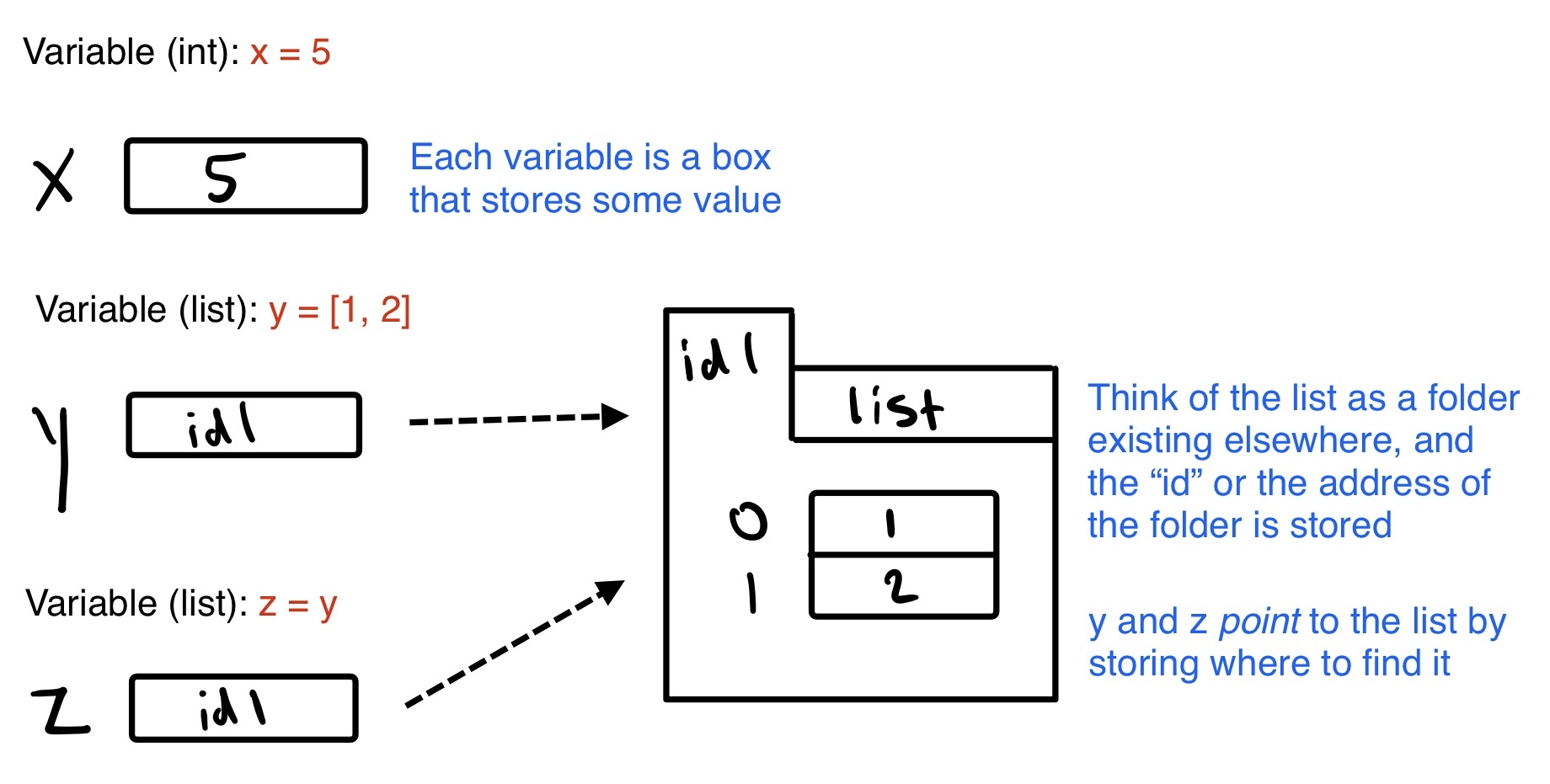
The following example illustrates the consequences of this, being that modifying a variable that points to a list means we see the modification from any variable that points to it.
a = [1,2,3,4] # a POINTS to this list, which is stored in memory
b = [5,6,7,8] # b POINTS to this list, which is stored in memory
print(a) # => [1,2,3,4]
print(b) # => [5,6,7,8]

a = b # a now POINTS to what b POINTS to

print(a) # => [5,6,7,8]
print(b) # => [5,6,7,8]

b.append(9) # modifying b

print(a) # => [5,6,7,8,9]
print(b) # => [5,6,7,8,9]

b.append(10) # modifying a again

print(a) # => [5,6,7,8,9,10]
print(b) # => [5,6,7,8,9,10]

# As both variables point to the same list in memory,
# modifying one modifies both
If we wanted to copy values, but maintain the independance of the lists so that modifying one does not modify the other, we would need to manually iterate through each list. This can be done cleanly with loops, which we will discuss in the loops section. Note that == checks if two lists have the same values and length, whereas a new keyword is checks if two variables point to the same list. This is dicsussed more in conditionals below.
At this point, try out challenge 2!

